
XCIPTV Player Setup on Firestick & Android (2026)
Last updated: · 4 min read · Playlist IPTV

Works on
TL;DR: Install XCIPTV Player, open it, choose Xtream Codes API (recommended), and enter the server URL, username and password from your IPTV subscription email. Your channels, movies, series and TV guide sync automatically. The player is completely free — you only pay for your IPTV subscription.
Important: XCIPTV is a player only — it contains no channels by itself. No subscription yet? Get instant activation here.
Step 1: Install XCIPTV Player on your device#
On Amazon Firestick / Fire TV
XCIPTV is not in the Amazon Appstore, so you sideload it with the free Downloader app:
- From the Firestick home screen, open Find → Search and type Downloader.
- Install the orange Downloader app and open it.
- Go to Settings → My Fire TV → Developer options and turn ON "Install unknown apps" for Downloader. (If Developer options is hidden: go to About and press select on "Fire TV Stick" 7 times.)
- Back in Downloader, type the official XCIPTV download address and press Go.
- When the APK downloads, press Install, then Open.
- Pin XCIPTV to your Firestick home row.
On Android TV / Google TV / Nvidia Shield
- Open the Google Play Store on your TV.
- Search for XCIPTV Player and press Install.
- Open the app once installation finishes.
On Android phone / tablet
Install XCIPTV Player from the Google Play Store and open it.
Note: XCIPTV is built for Android — iPhone and iPad are not officially supported. On iOS, use another player from our setup guides.
Step 2: Add your IPTV subscription (Xtream Codes recommended)#
- Open XCIPTV Player. On the login screen you see two options — choose Xtream Codes API.
- Enter the Server URL exactly as in your welcome email — including
http://and the port number (e.g.http://server.example.com:8080). - Enter your Username and Password carefully — they are case-sensitive, and a trailing space is the most common cause of "login failed".
- Press Sign In and wait 1–3 minutes while your content syncs — live TV, movies, series and the EPG TV guide appear automatically.
Or add an M3U playlist instead
- On the login screen choose M3U URL.
- Paste your full playlist URL from your welcome email and confirm.
- The channel list loads — add your EPG URL in the app's EPG settings if you want the TV guide.
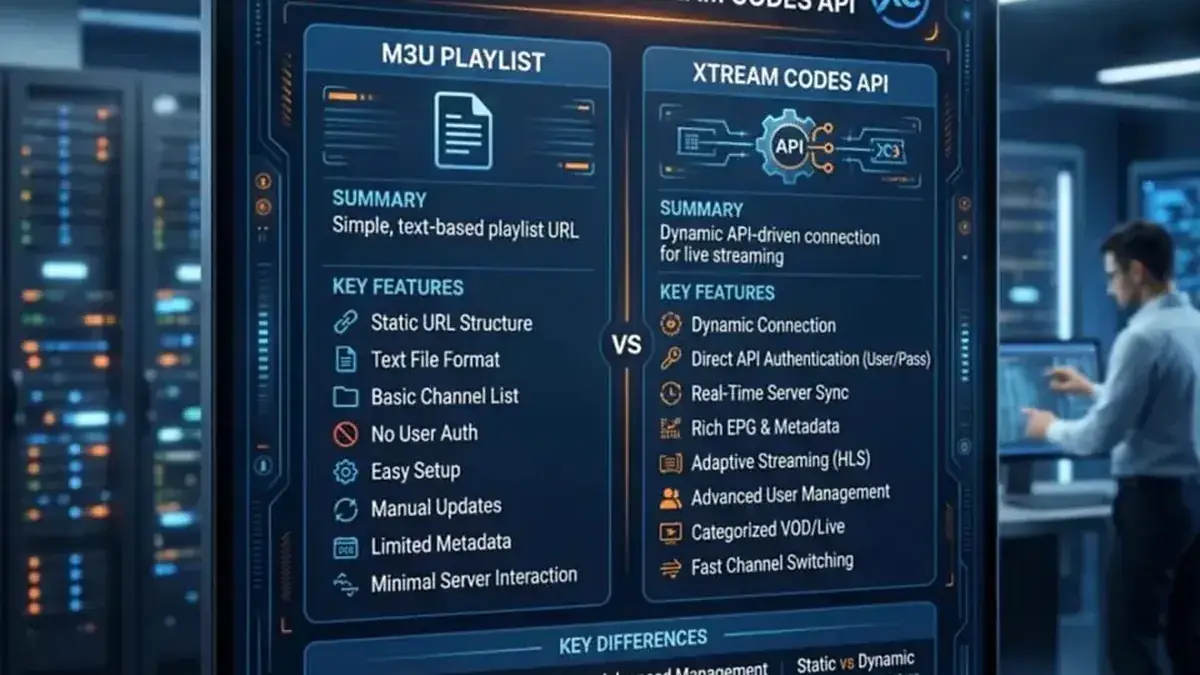
New to the two methods? Read M3U vs Xtream Codes.
Step 3: Set up the EPG and personalize#
- With Xtream Codes, the EPG loads automatically — open the guide and check program titles appear.
- Favorites: long-press any channel to add it to favorites for one-click access.
- Parental control: enable it in settings to lock adult or kids' categories with a PIN.
- Multiple playlists: XCIPTV supports several playlists at once — useful if you run more than one subscription.
Is XCIPTV Player really free?#
Yes — the player is free to use, forever. The official developer site is xcip.tv. Beware of copycat websites selling "XCIPTV subscriptions" — the app itself costs nothing; your channel subscription is a separate purchase from your IPTV provider.
We do not sell XCIPTV — it's a free app. We sell the IPTV subscription that fills it with channels.
Tips if something doesn't work#
- "Login failed! Please check your Server address, Username and Password": re-type the server URL by hand (with
http://and the port), and check the username/password for trailing spaces. - Changing server? XCIPTV ties its local data to the login session — there is no "edit server URL" inside a profile. Log out (or clear data) and set it up fresh; favorites will be wiped, so export them first if the app allows.
- Buffering: use a wired connection where possible, or the 5 GHz Wi-Fi band; on 4K, enable hardware decoding in the player settings.
Full troubleshooting: IPTV error codes & fixes.
Frequently Asked Questions
Is XCIPTV Player free?
Yes — completely free. Anyone charging you for "the XCIPTV app" is not the official developer. You pay only your IPTV provider for the subscription.
Xtream Codes or M3U in XCIPTV?
Xtream Codes — faster loading and automatic EPG. M3U works fine too. Compare them here: M3U vs Xtream Codes.
Does XCIPTV work on Firestick?
Yes — it's one of the most popular players on Firestick. Install it via the Downloader app (Step 1 above).
Does XCIPTV work on iPhone?
No — XCIPTV is Android-only. On iPhone/iPad use another player from our setup guides.
Can I record with XCIPTV?
Recording depends on the app version and your device storage — check the app's settings for a record option. Most users watch live without recording.
Related guides
Ready to watch? Get your IPTV subscription now.
Instant activation — M3U playlist + Xtream Codes login + EPG, delivered by email in minutes. Pay with Bitcoin.
Buy IPTV Subscription